 我的开源
我的开源
『 ProtocolBuffer 』初识ProtocolBuffer

1 什么是ProtoBuf
Protocol Buffers是一块由Google开发并开源的一款, 与语言/平台无关的一种可拓展的序列化结构数据机制;
与常规的数据格式, 如XML/JSON等数据格式不同, Protobuf序列化的数据是一种二进制格式的数据, 其体积远小于JSON/XML, 因此编解码的速度较快;
同时Protobuf序列化后的数据为二进制流格式, 因此在数据传输过程中, 数据相对安全(不明文展示序列化后的数据);
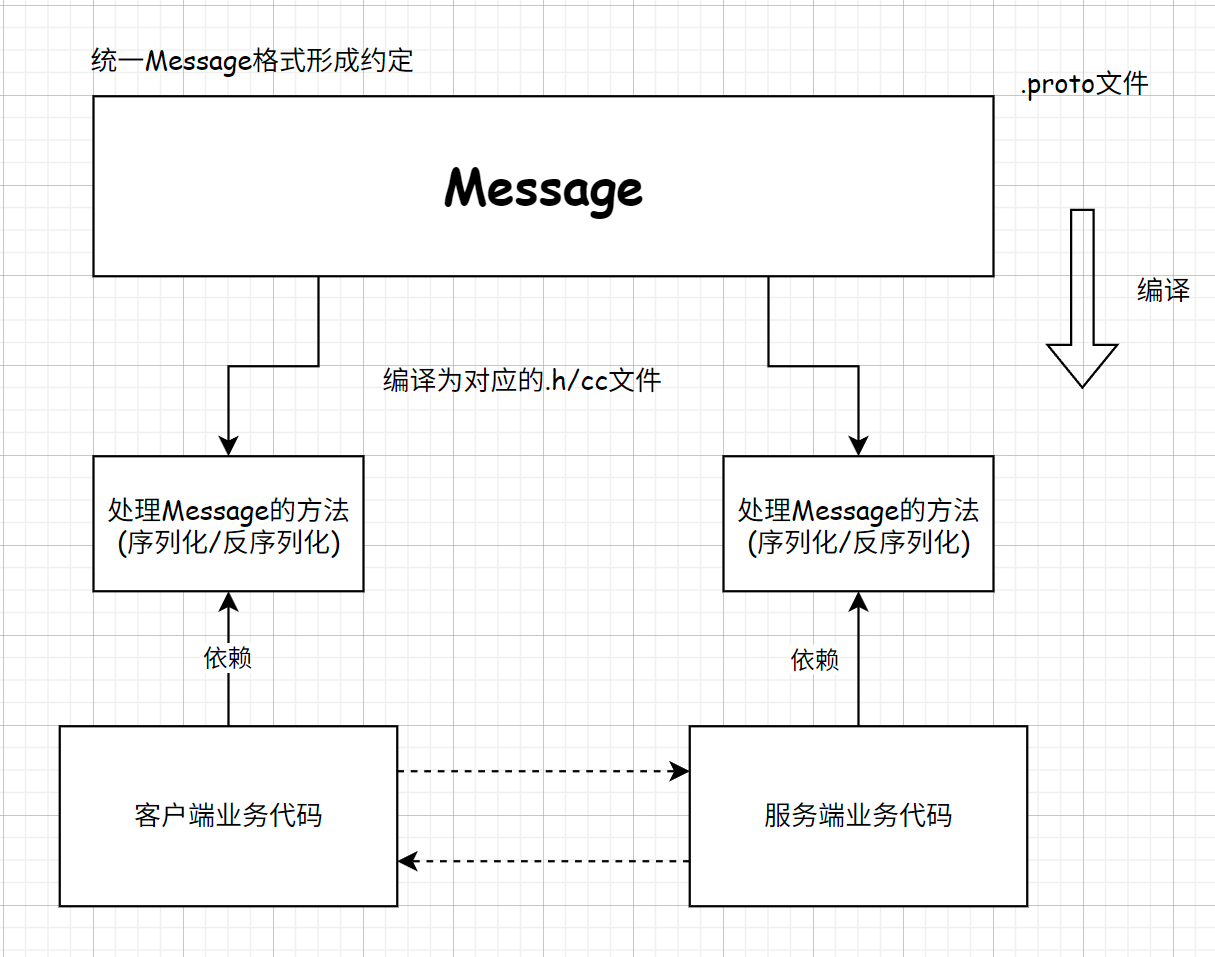
Protobuf强制通信双方编写.proto文件定义数据结构从而形成约定;
同时Protobuf支持向后兼容, 即在不破坏旧代码的情况下更新数据, 例如更新新字段;
2 标量数据类型
所谓标量数据类型指的是一种单位数据最小的原子类型数据, 这种数据由于为基本类型, 因此无法被细分的更小;
ProtocolBuffers对应的数据类型与编译后常用的C++数据类型为如下:
| .proto Type | Notes | C++ Type |
|---|---|---|
| double | double | |
| float | float | |
| int32 | 使用变长编码[1]。负数的编码效率较低——若字段可能为负值,应使用 sint32 代替。 | int32 |
| int64 | 使用变长编码[1]。负数的编码效率较低——若字段可能为负值,应使用 sint64 代替。 | int64 |
| uint32 | 使用变长编码[1]。 | uint32 |
| uint64 | 使用变长编码[1]。 | uint64 |
| sint32 | 使用变长编码[1]。符号整型。负值的编码效率高于常规的 int32 类型。 | int32 |
| sint64 | 使用变长编码[1]。符号整型。负值的编码效率高于常规的 int64 类型。 | int64 |
| fixed32 | 定长 4 字节。若值常大于 $2^{28}$ 则会比 uint32 更高效。 | uint32 |
| fixed64 | 定长 8 字节。若值常大于 $2^{56}$ 则会比 uint64 更高效。 | uint64 |
| sfixed32 | 定长 4 字节。 | int32 |
| sfixed64 | 定长 8 字节。 | int64 |
| bool | bool | |
| string | 包含 UTF-8 和 ASCII 编码的字符串,长度不能超过 $2^{32}$。 | string |
| bytes | 可包含任意的字节序列但长度不能超过 $2^{32}$。 | string |
在表中的内容, 出现了=="变长编码[1]"==的概念, 所谓的变长编码, 指的是, 在序列化与反序列化过程中进行的;
Protobuf的原理为, 编写.proto文件, 对.proto文件进行编译, 通过 protoc --cpp_out=. filename.proto的方式, .protoc将被编译为对应的cpp - .h/cc文件, 当对应的.cc/.h文件调用对应的序列化与反序列化时, 对应的变长编码数据将根据其在.proto的描述, 以其自身的规则进行长度变化;
其中变长编码[1]指的是, 当一个数据为int32, 其最大能存储4byte的数据, 但在进行数据存储过程中, 若是没有存储相应的长度, 那么这个数据在序列化过程中, 将会变长为1byte, 若是存储的数据大小近似int32, 那么序列化之后的数据将会变为5byte, 其中一位需要作为标志位;
3 简单的ProtocolBuffer文件编写与使用
3.1 基本内容编写
// 首行为语法指定行 - 此次指定语法为proto3
syntax = "proto3";
package test; // 类似于命名空间 - 防止message命名冲突

// 定义message
message PeopleInfo{
    string name = 1;
    int32 age = 2;
    /*
    * 此处的1与2不代表赋值
    * 在proto中不存在赋值的概念
    * 此处的1与2实际上是一种编号
    * 编号是一个message中标识成员的唯一字段
    */
}
在本系列博客中, 所使用到的语法都为proto3;
在Protobuf中, 强制要求在编写.proto文件的首行必须表明所使用的Protobuf的版本号, 这里指定为proto3, 若是不显式版本号, 那么Protobuf将默认认为使用的是proto2的语法, 进而编译失败;
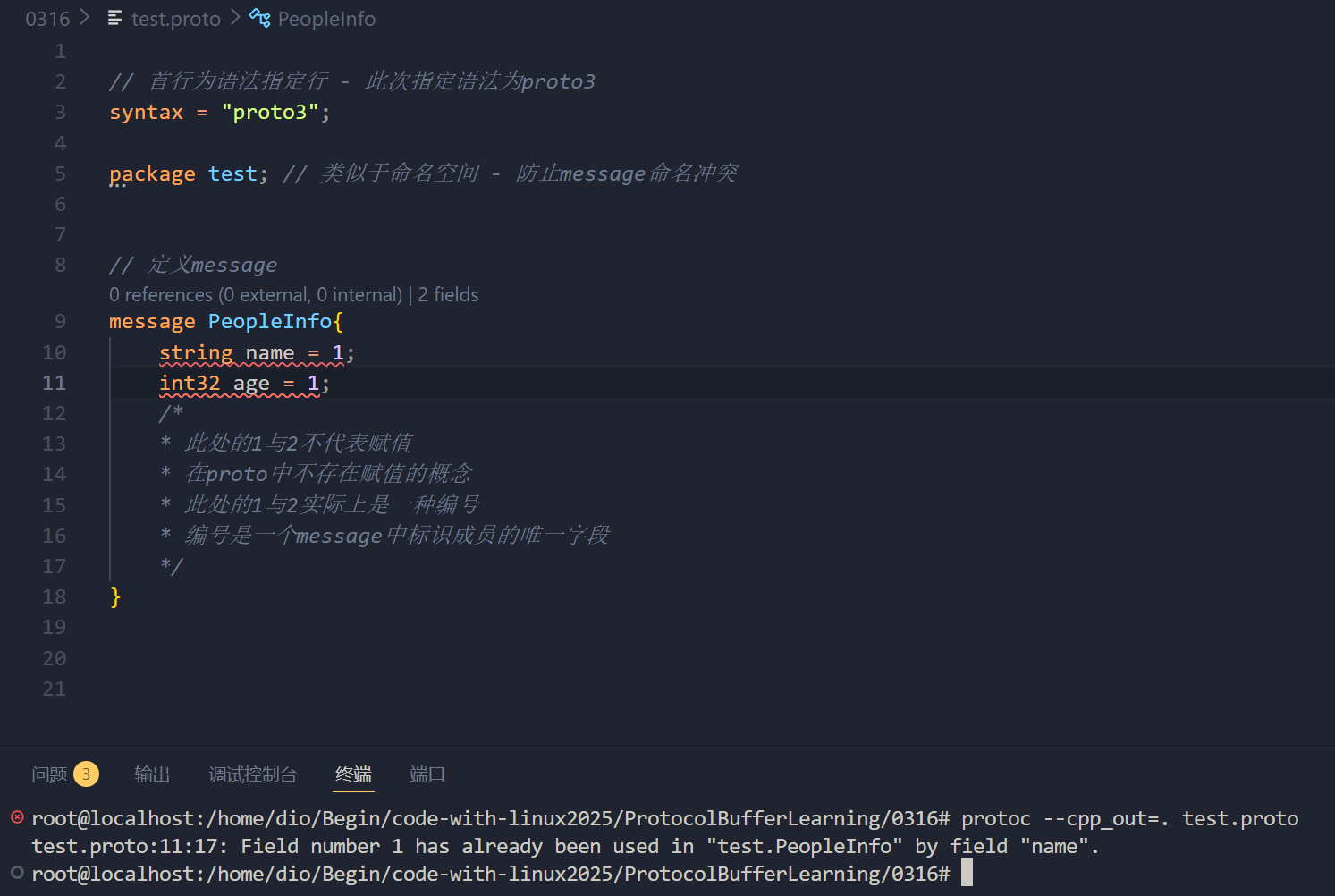
其次是在注释中提到了=符号跟着的是编号而不是赋值, 本身Protobuf无赋值概念, 在一个message中, 编号是用于表明某个字段的唯一性, 在一个message中, 两个字段不能使用相同的编号, 也不能使用相同的成员名;
需要注意的是,
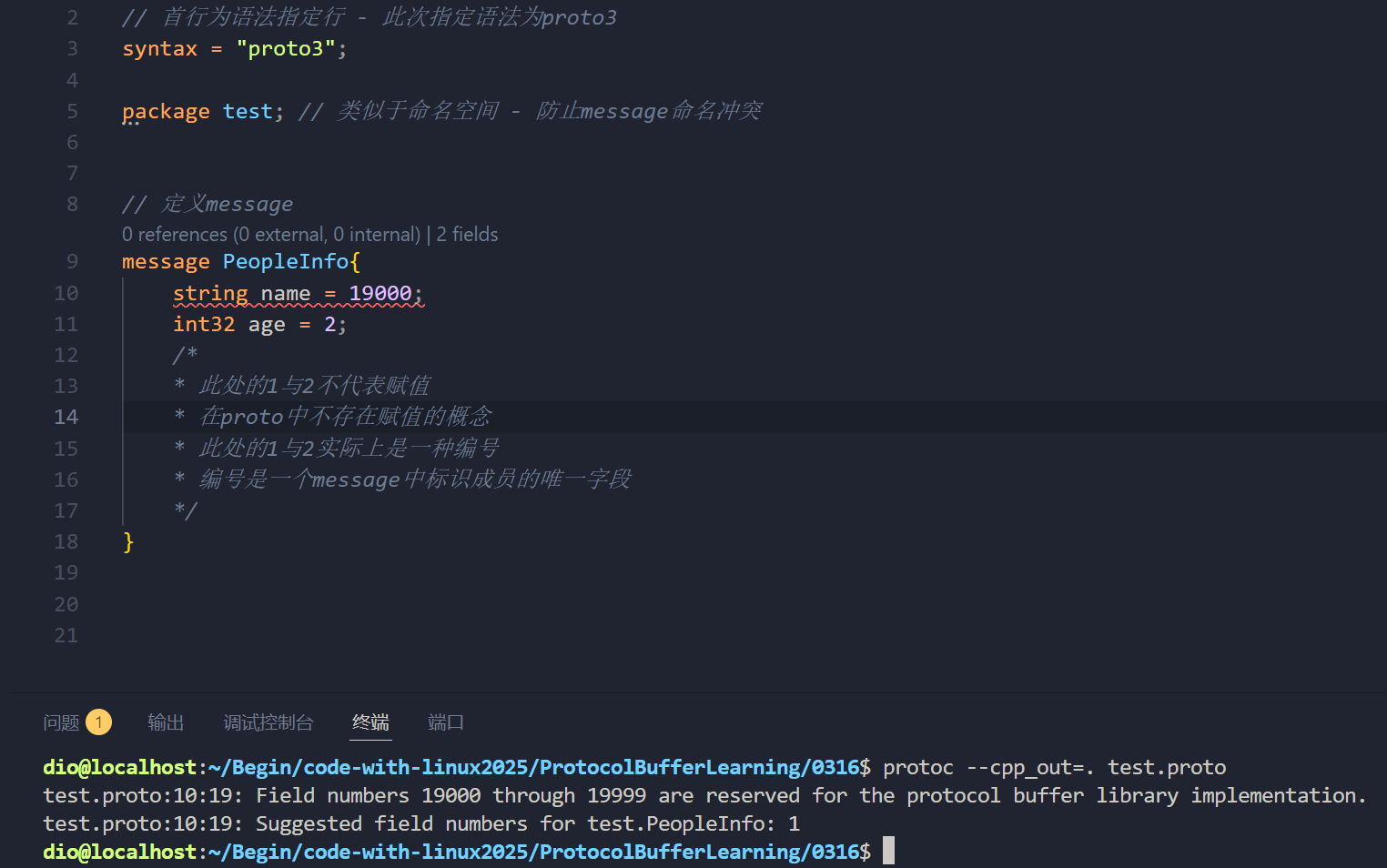
proto的编号为==1~2^29^-1==, 其中19000~19999不可用;本质上是在
Protobuf协议的实现中, 对这些编号进行了预留, 若是强行使用, 将会编译报错;
同时在
Protobuf中,1-15的字段编号需要一个字节进行编码, 而16-2047内的数字需要两个字节进行编码, 编码后的字节既保留的编号, 也包含了字段类型, 因此通常使用1-15的编号来标记出现非常频繁的字段;
3.2 .proto 文件的编译
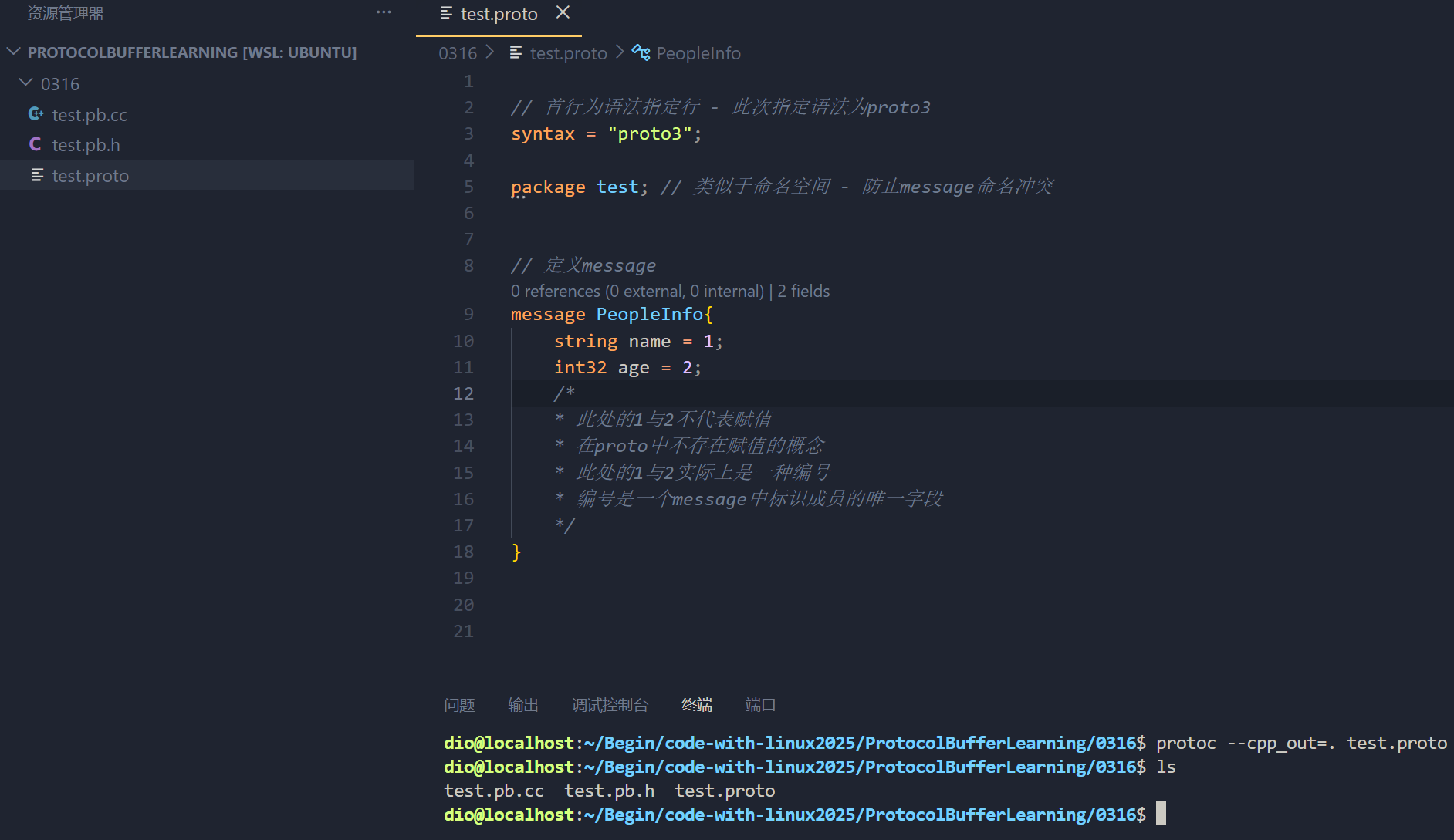
.proto文件的编译命令为:
# 当前目录
protoc --cpp_out=. [path/filename.proto]

# 指定 proto 搜索路径和输出目录
protoc -I [proto搜索路径] --cpp_out=[输出目录] [filename.proto]
这个编译命令是将.proto文件的内容编译为cpp文件;
对应的protocol buffer支持将对应的.proto文件转为其他语言的文件, 表示其对其他语言的支持;
3.3 Protobuf 的编译结果
当.proto文件编译过后, 将会生成对应的.cc/.h文件, 这两个文件中, 以.h文件为例, .proto中定义的message将会被编译为对应的class, 其中class命名与.proto的命名相同, 且在这个class中将存在一些其他内容, 具体来说, 对应的内容为:
class message_name{
    // - 定义一系列属性字段
    // - 处理字段的方法(get/set 等)
    // - 处理类的方法(序列化/反序列化 等)
};
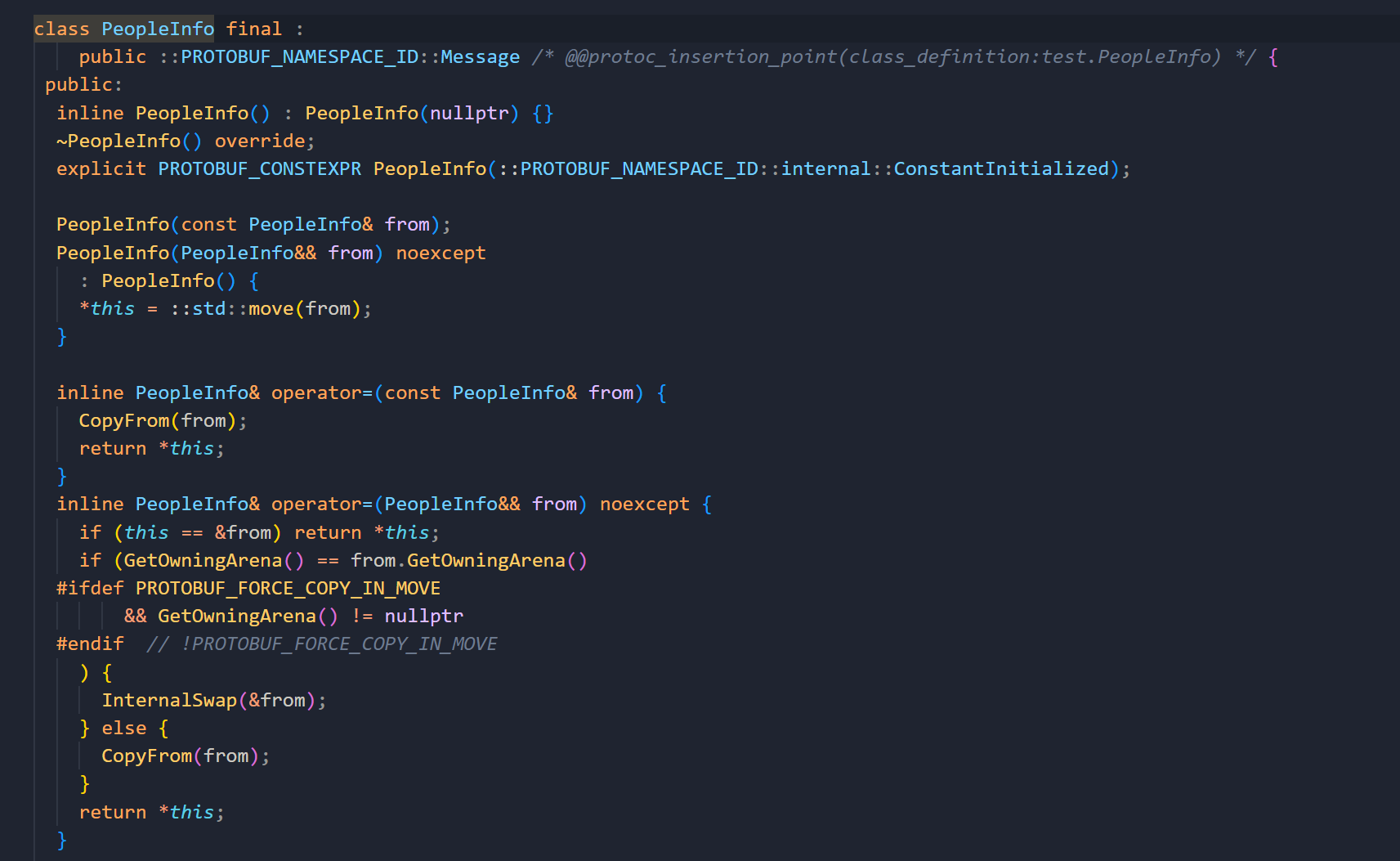
此处只展示部分;
-
字段处理方法:
// string name = 1; void clear_name(); // 清空name字段 const std::string& name() const; // 获取name字段 - get方法 template <typename ArgT0 = const std::string&, typename... ArgT> void set_name(ArgT0&& arg0, ArgT... args); // 设置name字段 - set方法 std::string* mutable_name(); // 近似于set字段 - 返回对应的指针, 可将string的地址进行赋值 /* ... */ // int32 age = 2; void clear_age(); // 清空age字段 int32_t age() const; // 获取age字段的值 - get方法 void set_age(int32_t value); // 设置age字段 - set方法 /* ... */ -
序列化/反序列化方法
序列化和反序列化的方法通常是在所命名类
message的父类class Message的父类MessageLite;/* 反序列化 */ PROTOBUF_ATTRIBUTE_REINITIALIZES bool ParseFromCodedStream( io::CodedInputStream* input); // Like ParseFromCodedStream(), but accepts messages that are missing // required fields. PROTOBUF_ATTRIBUTE_REINITIALIZES bool ParsePartialFromCodedStream( io::CodedInputStream* input); // Read a protocol buffer from the given zero-copy input stream. If // successful, the entire input will be consumed. PROTOBUF_ATTRIBUTE_REINITIALIZES bool ParseFromZeroCopyStream( io::ZeroCopyInputStream* input); // Like ParseFromZeroCopyStream(), but accepts messages that are missing // required fields. PROTOBUF_ATTRIBUTE_REINITIALIZES bool ParsePartialFromZeroCopyStream( io::ZeroCopyInputStream* input); // Parse a protocol buffer from a file descriptor. If successful, the entire // input will be consumed. PROTOBUF_ATTRIBUTE_REINITIALIZES bool ParseFromFileDescriptor( int file_descriptor); // Like ParseFromFileDescriptor(), but accepts messages that are missing // required fields. PROTOBUF_ATTRIBUTE_REINITIALIZES bool ParsePartialFromFileDescriptor( int file_descriptor); // Parse a protocol buffer from a C++ istream. If successful, the entire // input will be consumed. PROTOBUF_ATTRIBUTE_REINITIALIZES bool ParseFromIstream(std::istream* input); // Like ParseFromIstream(), but accepts messages that are missing // required fields. PROTOBUF_ATTRIBUTE_REINITIALIZES bool ParsePartialFromIstream( std::istream* input); /* 序列化 */ bool SerializeToCodedStream(io::CodedOutputStream* output) const; // Like SerializeToCodedStream(), but allows missing required fields. bool SerializePartialToCodedStream(io::CodedOutputStream* output) const; // Write the message to the given zero-copy output stream. All required // fields must be set. bool SerializeToZeroCopyStream(io::ZeroCopyOutputStream* output) const; // Like SerializeToZeroCopyStream(), but allows missing required fields. bool SerializePartialToZeroCopyStream(io::ZeroCopyOutputStream* output) const; // Serialize the message and store it in the given string. All required // fields must be set. bool SerializeToString(std::string* output) const; // Like SerializeToString(), but allows missing required fields. bool SerializePartialToString(std::string* output) const; // Serialize the message and store it in the given byte array. All required // fields must be set. bool SerializeToArray(void* data, int size) const; // Like SerializeToArray(), but allows missing required fields. bool SerializePartialToArray(void* data, int size) const; // Make a string encoding the message. Is equivalent to calling // SerializeToString() on a string and using that. Returns the empty // string if SerializeToString() would have returned an error. // Note: If you intend to generate many such strings, you may // reduce heap fragmentation by instead re-using the same string // object with calls to SerializeToString(). std::string SerializeAsString() const; // Like SerializeAsString(), but allows missing required fields. std::string SerializePartialAsString() const; // Serialize the message and write it to the given file descriptor. All // required fields must be set. bool SerializeToFileDescriptor(int file_descriptor) const; // Like SerializeToFileDescriptor(), but allows missing required fields. bool SerializePartialToFileDescriptor(int file_descriptor) const; // Serialize the message and write it to the given C++ ostream. All // required fields must be set. bool SerializeToOstream(std::ostream* output) const; // Like SerializeToOstream(), but allows missing required fields. bool SerializePartialToOstream(std::ostream* output) const;其中
SerializeXXX相应的方法为序列化方法, 序列化的方法有很多, 包括以数组的形式存储, 字符串的形式存储, 但存储的方式与数据本身无关, 经过ProtocolBuffers序列化的数据都是以二进制流的方式进行存储, 这是与类似于Jsoncpp - json等明文的格式化数据化格式的序列化最大的区别;对应的
ParseXXX相应的方法为反序列化的方法, 将根据对应的格式, 将数据进行反序列化并存储到一个新的同类型对象中;
3.4 Protobuf cpp文件中 序列化/反序列化 方法的使用
通过protobuf编译出的.pb.cc/.pb.h文件对数据进行序列化和反序列化操作;
#include <iostream>

#include <string>

#include "test.pb.h" // - 引入头文件

int main()
{
    std::string tmp; // 创建序列化后数据流的存储位置
    // RAII
    {
        test::PeopleInfo people; // 构造message对象
        people.set_name("张三"); // 通过set方法设置字段值
        people.set_age(66); // 通过set方法设置字段值

        if (!people.SerializeToString(&tmp)) // 使用序列化方法需要传入一个指针(存储空间的指针 - 输出型变量) - 若是序列化失败将会返回false, 否则返回true
        {
            std::cerr << "序列化失败" << std::endl;
            return -1;
        }
    }
    std::cout << tmp << std::endl; // 这里标识序列化成功 - 对序列化后的内容进行打印
    // RAII
    {
        test::PeopleInfo people; // 创建一个新的对象用于接收反序列化的内容
        if (!people.ParseFromString(tmp)) // 对字符串tmp进行反序列化并将对应的值根据规则赋值回给people对象
        {
            std::cerr << "反序列化失败" << std::endl;
            return -1;
        }
        std::cout << people.name() << "," << people.age() << std::endl; // 打印序列化成功后的内容
    }
    return 0;
}
这是Protobuf的一个基本使用, 在编译过程中, 由于需要使用到Protobuf的API接口, 因此必须在编译过程中通过-l来指定库位置, 否则将会出现链接失败;
g++ -o run main.cpp test.pb.cc -lprotobuf
运行结果为如下:
$ ./run

张三B
张三,66
运行结果中, 可以看到, 序列化的结果为==[第一行空行(不可见字符显示为空行) 第二行出现了一个张三B]==;
-
为什么会出现"张三"字样
Protobuf的序列化结果确实是二进制流, 但在序列化过程中,Protobuf对string类型的数据序列化操作为TLV操作, 即string内容将以原样进行存储不进行改动, 但在string前将会存储该字符串的Tag+Length, 即整个存储方式为Tag-Length-Value, 由于字符串部分直接以utf-8的形式进行存储, 因此在对二进制流打印时, 将会正常打印string字符串的原内容;
与XML/Json而言, Protobuf是相对安全的;
标题:『 ProtocolBuffer 』初识ProtocolBuffer
作者:orion
地址:http://orionpeng.top/articles/2026/03/17/1773721126685.html